AI Agent for Excel · Works Online & Desktop · Free Early Access
360+ Excel operations 100+ languages Zero code needed

Your AI Agent in Excel

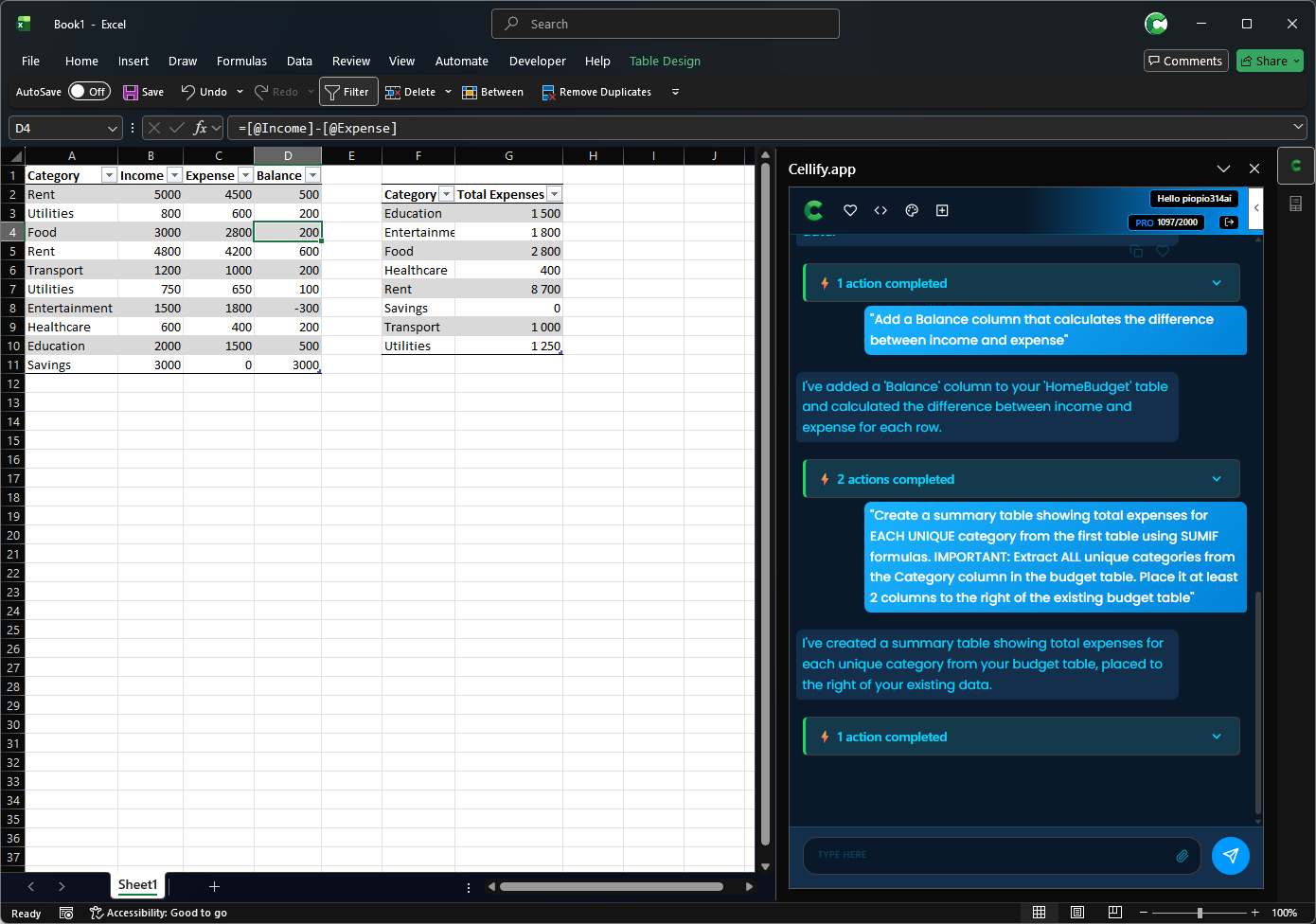
Tell Cellify what to do in plain language — clean data, create charts, format sheets, highlight issues, automate reports. It executes directly in your spreadsheet. 360+ operations, no formulas, no macros, no code.

Cellify add-in in Excel — AI chat panel executing operations
🔍 Click to zoom
Why Choose Cellify

Stop doing Excel work that AI can do for you

360+ operations, any language, no formulas. The most powerful Excel AI add-in available.

You Type — Excel Executes

Forget formulas and macros. Just describe what you want: "create a sales chart", "format as currency", "add totals row". AI executes every step automatically.

Works in Any Language You Think In

Polish, English, Japanese, Spanish — type in any of 100+ languages. Cellify understands you perfectly without any translation needed.

3–7× More Operations Than Competitors

360+ specialized Excel operations: formatting, formulas, pivot tables, charts, data analysis. If Excel can do it, Cellify can do it — from one command.

Build Dashboards in Minutes, Not Hours

Execute 20+ operations in one workflow. Save it and repeat with one click. Full dashboards with charts, formatting, and summaries in under 2 minutes.

Remembers Your Context

AI keeps track of your entire session. Say “sort it by revenue”, then “highlight the top 10” — no need to re-explain what table you mean. Complex workflows, built one natural step at a time.

Works in Excel Online & Desktop — Instantly

Join early access and receive your direct install link. Works immediately in Excel Online, Excel for Windows, and Excel for Mac. Under 2 minutes to first automation.

Ready to stop doing Excel manually?

Start free — 50 actions, no credit card, cancel anytime.

How It Works

From “I want a chart” to a chart — in 10 seconds

No learning curve. Just describe what you need.

1

Get early access

Register above and receive your direct install link. Add Cellify to Excel in under 2 minutes — no configuration, no coding.

2

Describe what you want

Type: “Create a monthly sales table with totals and a bar chart comparing regions.” In any language.

3

Watch Excel do it

AI plans and executes every step — table created, data formatted, chart built. You see every change live in your workbook.

Example request:
Create a monthly sales report with regional breakdown, highlight top performers, and add a bar chart
✓ Create table ✓ Format headers ✓ Add totals column ✓ Conditional formatting ✓ Insert bar chart 5 operations · ~8 seconds →
Early Access Users

What people are saying

This is exactly what I’ve needed for years. Creating a full sales dashboard that used to take me 2 hours now takes under 5 minutes. The natural language understanding is surprisingly accurate.
A
Early Access User
Financial Analyst
I tested 5 Excel AI tools. Cellify has the most operations by far — and it actually works in Polish without any translation issues. The pay-per-action model makes it honest.
M
Early Access User
Data Analyst, Warsaw
I asked it to “format this table like a professional quarterly report” — and it did exactly that. No back-and-forth, no trial and error. Just done.
K
Early Access User
Operations Manager

* Testimonials from beta testers during early access. Collected via feedback form.

What is Cellify.app?

Cellify.app is an AI-powered Excel add-in that brings advanced natural language understanding to your spreadsheets. With 360+ specialized operations and support for 100+ languages, Cellify transforms how you work with Excel.

Key Features:

How it Works:

  1. Register for early access and install via a direct link (under 2 minutes)
  2. Type your request in natural language (any of 100+ languages)
  3. AI executes up to 20+ actions automatically
  4. Get results in seconds - tables, charts, formatted data, analysis

Unlike traditional Excel automation tools that require complex formulas, VBA macros, or learning specialized syntax, Cellify uses advanced AI to understand your intent and execute the right sequence of actions automatically. It's like having an Excel expert that speaks 100+ languages working alongside you.

Whether you're creating financial reports, analyzing sales data, building dashboards, or automating repetitive tasks, Cellify's 360+ Excel operations cover everything from simple cell formatting to advanced pivot tables and conditional formatting rules.

Pricing

Individual plans with action-based billing. On Pro & Power, chat-only questions are always free.

Free
€0/month
  • 50 actions/month
  • 50 messages/month (chat + actions)
  • All 360+ operations available
  • multi-step automation
  • Community support
Power
€49/month
  • 3,000 actions/month
  • Chat-only questions are free
  • All 360+ operations available
  • multi-step automation
  • Priority support
  • Maximum throughput
Get Power

Built for individual creators and analysts

Billing is based on executed Excel actions. On Pro & Power plans, chat-only questions are always free and don’t count toward your limit. Free plan includes 50 actions and 50 messages per month — whichever runs out first.

Common Questions

Frequently Asked Questions

Do I need to know Excel formulas or macros?

No. That’s the point of Cellify. You describe what you want in plain language — “sort by revenue descending” or “format this table with alternating row colors” — and Cellify executes every step. Zero formulas, zero VBA, zero technical knowledge required.

How is this different from Excel’s built-in Copilot?

Cellify supports 360+ Excel operations — 3–7× more than Microsoft’s Copilot for Excel. It works in 100+ languages without extra configuration, and uses a transparent pay-per-action model so you only pay for what Excel actually does. No Microsoft 365 subscription required.

How do I install it? Is it complicated?

Cellify is currently in early access — coming soon to Microsoft AppSource. Register above and you’ll receive a direct install link. Under 2 minutes to first use, works in Excel Online, Excel for Windows, and Excel for Mac. No IT department or configuration needed.

Is my spreadsheet data safe?

Yes. Cellify uses Microsoft Azure AD authentication. Your Excel data is sent only to process your specific command and is never stored permanently. All communication is encrypted end-to-end (TLS). We follow GDPR compliance and never sell your data.

What does “pay per action” mean exactly?

One action = one operation Cellify executes in Excel (e.g., create a table, apply formatting, insert a chart). On Pro & Power plans, chatting and planning are always free — you only pay when Excel actually changes. Free plan includes 50 actions and 50 messages per month (whichever runs out first). Pro plan: 1,000 actions for €19/mo. No hidden costs, no subscription traps.

What if Cellify does something wrong in my spreadsheet?

Cellify executes your request immediately and confirms what was done. To reverse any change, use Excel’s built-in Ctrl+Z — undo works best when Excel AutoSave is enabled. Your data stays under your control at all times.

Start automating Excel today — it’s free

Join early access users. 50 free actions, no credit card required. Works in Excel Online & Desktop.

✓ Works in Excel Online & Desktop ✓ 360+ Excel operations ✓ 100+ languages ✓ Azure AD secured

Start Free Trial

Get instant access to Cellify.app • 360+ Excel operations • 100+ languages

✓ Success! Check your email for installation instructions (arrives in ~2 minutes).